给你的回复添加个性签名!
当你回复别人的文章的时候是否希望别人记住你呢?下面一个简单的油猴脚本可以让你每次发回复时附带一个个性签名:
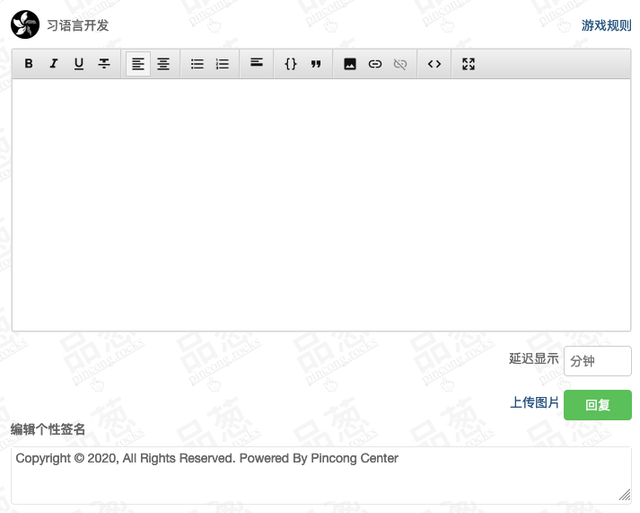
当你点击回复的时候,就会自动附带这个签名!并且这个签名会被记住,下次打开帖子就不用重复编辑啦!
如何使用呢?首先你需要 Chrome 或者 Firefox 浏览器,然后安装 Tampermonkey。启用后,点击右上角的油猴图标,然后点击 Create New Script,将以下代码复制到代码框,然后刷新网页,点进任意一个品葱的问答,不出意外就能看到个性签名的输入框了。
更新 1:
貌似对自己发的主题帖不适用,更改了按钮的选择方式
更新 2:
Selector 又改了。。
复制以下代码:
当你点击回复的时候,就会自动附带这个签名!并且这个签名会被记住,下次打开帖子就不用重复编辑啦!
如何使用呢?首先你需要 Chrome 或者 Firefox 浏览器,然后安装 Tampermonkey。启用后,点击右上角的油猴图标,然后点击 Create New Script,将以下代码复制到代码框,然后刷新网页,点进任意一个品葱的问答,不出意外就能看到个性签名的输入框了。
更新 1:
貌似对自己发的主题帖不适用,更改了按钮的选择方式
更新 2:
Selector 又改了。。
复制以下代码:
// ==UserScript==

// @name         Pincong Auto Reply Footer

// @namespace    http://tampermonkey.net/

// @version      0.1

// @description  try to take over the world!

// @author       Xidada

// @include      /https://pincong\.rocks/(article|question)/.*/

// @grant        none

// @noframes

// ==/UserScript==


const panelSelector = ".aw-editor-box";

const submitSelector = "a.btn.btn-normal.btn-success.pull-right.btn-reply";


(function () {

    'use strict';

    setTimeout(() => {

        const instance = document.getElementById("wmd-input")._sceditor;


        const panel = document.querySelector(panelSelector);


        const title = document.createElement("H5");

        title.innerText = "编辑个性签名";

        panel.appendChild(title);


        const inputContainer = document.createElement("DIV");

        inputContainer.classList.add("aw-editor-box", "mod-head");


        const footerInput = document.createElement("TEXTAREA");

        footerInput.style.width = "100%";

        footerInput.style.borderWidth = "1px";

        footerInput.value = localStorage.getItem("footer") || "";


        inputContainer.appendChild(footerInput);


        panel.appendChild(inputContainer);


        const submitBtn = document.querySelector(submitSelector);

        submitBtn.innerText = "回复并附带签名!";

        const oldOnClick = submitBtn.onclick;


        submitBtn.onclick = function (e) {

            // Save old signature

            localStorage.setItem("footer", footerInput.value);


            if (footerInput.value.length > 0) {

                instance.insert("\n\n[hr]\n" + footerInput.value);

            }

            oldOnClick.bind(this)(e);

        }

    }, 1000);

})();

